Why is the location on my iPhone photo wrong or missing?
Updated · 5 min read
An iPhone photo shows no location or the wrong one for one of four reasons: the Camera is not allowed to use location, Precise Location is off so the phone only knows a wide area, the GPS fix was weak when you pressed the shutter, or the photo did not come from your iPhone Camera and never had a place. The first two are settings you can fix in a minute; the third you fix by waiting or stepping outside; for a photo already taken you can correct the place by hand.
This guide goes through them in the order worth checking, then covers what to do when the place matters to someone else.
Why does my photo have no location at all?
Check these in order:
- Settings → Privacy & Security → Location Services must be on.
- Scroll down to Camera and choose While Using the App. If it says Never, no new photo gets a place.
- A photo you received through a chat app, a download or a screenshot usually has no place: those paths often drop the data or never had it. A photo from a DSLR or other camera has none unless that camera has GPS.
- Photos taken before you changed the setting stay without a place. Turning it on only affects new photos.
To check one photo, open it in Photos and swipe up (or tap ⓘ). If a small map appears, the place is stored; if not, there is none to show.
Why is the place wrong, sometimes by kilometres?
Open Settings → Privacy & Security → Location Services → Camera and check that Precise Location is on. With it off, iOS hands the app an approximate area, which can be kilometres across, so the photo lands in the wrong neighbourhood or the wrong town. The same switch exists for every app that uses location, so a different camera app can be wrong for its own reason.
If Precise Location is on and the place is still off, the cause is usually a weak fix.
What does a weak GPS fix look like, and what helps?
Phone GPS is good under open sky and poor indoors, in a basement, under a metal roof, in a lift or between tall buildings. Right after you open the camera the first fix is also often the roughest, and it improves within seconds as the phone hears more satellites and nearby networks. A fix can be off by tens of metres, which is enough to put a photo on the next street or across a ward boundary.
- Open the camera and wait a few seconds before the shot that has to carry the place.
- For that shot, step to a window, a doorway or the open air.
- Take a second photo in the open and keep it with the first if the place matters.
An iPad without cellular has no GPS chip, so it finds its place from Wi-Fi only and can be far less exact.
How do I correct the place on a photo I already took?
Open the photo in Photos, swipe up (or tap ⓘ), tap Adjust under the map and search for the right place, or choose No Location to remove it. This changes the photo in your library, not copies you already sent, and it only changes the place stored in the file. It does not change anything printed on the picture, and the exact screens depend on your iOS version.
Use it to fix an honest mistake, not to move a photo somewhere it was not taken: if someone relies on the place, an edited location defeats the point of having one.
What if the place has to be right, for someone else?
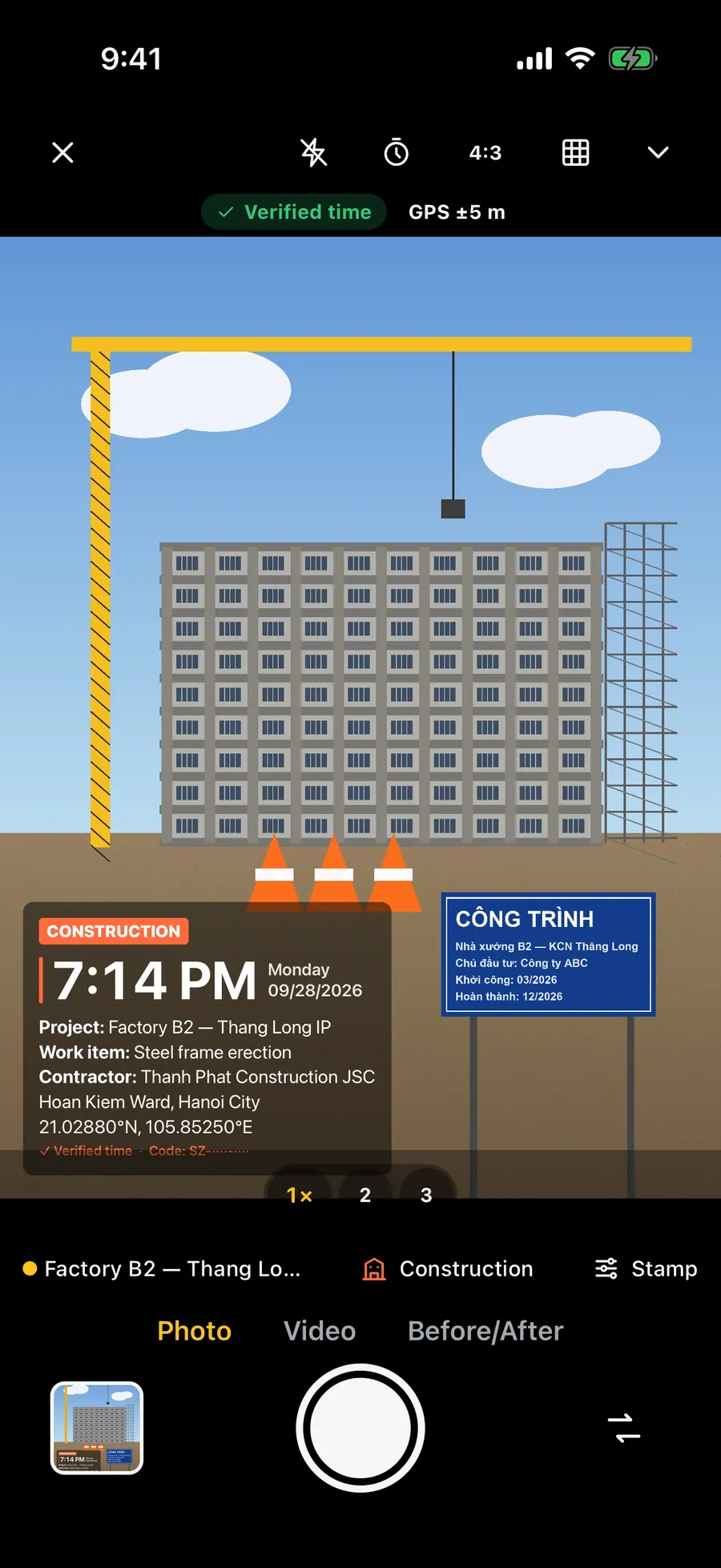
For a delivery, a site visit, a rental or a claim, do not rely on hidden data a chat app may strip. Print the place on the photo, check it against what you see before you shoot, and treat it as a record of what the phone reported, not as proof. A wrong ward, a coordinate a few streets off or an address from a poor fix is much easier to catch when it is on the picture and the recipient can compare it with the real spot.
Frequently asked questions
- Why does my iPhone photo say No Location?
- Usually the Camera is set to Never under Settings → Privacy & Security → Location Services, or Location Services is off, or the photo came from a chat app, a download or another camera and never carried a place. Turning the setting on fixes new photos only.
- Why is my photo location a few streets away?
- The phone's GPS fix was weak, which is common indoors and right after opening the camera. Wait a few seconds or step into the open before the shot. Phone GPS can be off by tens of metres.
- What does Precise Location do?
- With it on, an app gets your exact position. With it off, iOS gives only an approximate area that can be kilometres across, so photos can land in the wrong neighbourhood. Find it under Location Services for each app.
- Can I change the location of a photo?
- Yes. In Photos, open the photo, swipe up, tap Adjust under the map and pick the right place, or choose No Location. It changes the photo in your library only, and it should be used to fix a mistake, not to misstate where a photo was taken.
- Does Stampzy fix a wrong GPS location?
- No. It prints the address from the fix the phone has, and warns on the camera when location is off, approximate or weak. A better fix comes from precise location and a clear view of the sky.