How to photograph a rental car before you drive away
Updated · 4 min read
Before you drive a rental car off the lot, photograph every side of it, close up on any scratch, dent or chip, then the wheels, the windscreen, the interior, and the dashboard showing fuel and mileage. Add one slow walkaround video, and make sure anything you find is also written on the rental company's form. Do it again when you return the car.
This guide covers what to shoot, in what order, and how to keep the time and place visible. Each rental company has its own damage and dispute rules, so read your contract first; this is photo advice, not legal advice.
When should I take the photos?
- At pickup, before you leave the lot or car park, and before you load your luggage. If the light is bad, ask to move the car or wait for better light rather than skipping a side.
- Show the staff any damage you find and ask for it to be written on the rental form. Photos support the form; they do not replace it.
- At return, repeat the same set in the same order, ideally with a member of staff present, so the two sets can be compared.
Which photos do I need, and in what order?
1. The whole car from the front, the back and both sides, and the roof if you can see it.
2. Each panel in turn: bumpers, doors, wings, bonnet and boot lid. Walk round once in the same direction every time.
3. A close-up of every mark you find, with a second photo a little further back so it is clear where on the car it is. Holding a coin or a pen near a scratch shows its size.
4. All four wheels and tyres, including the rims, which are often scuffed on kerbs.
5. The windscreen, the side and rear glass, and the mirrors, looking for chips and cracks.
6. The interior: seats, the upholstery, the boot and any stains, burns or tears. Also the spare wheel and tools if the contract lists them.
7. The dashboard with the engine on, showing the fuel level, the mileage and any warning lights.
8. The paperwork: the rental agreement, the damage form and the car's plate number.
Should I film a video as well?
A slow walkaround video is a good addition to the photos, because it shows the car as a whole and in one continuous take. Walk round the car once, pausing on each mark, then film the interior and the dashboard.
- Say the date, the plate number and the rental company's name aloud at the start.
- Keep the phone steady and move slowly, so marks are not a blur.
- Keep the video and the photos together, with the originals on your phone, not only copies sent through a chat app.
How do I show the time and place on the photos?
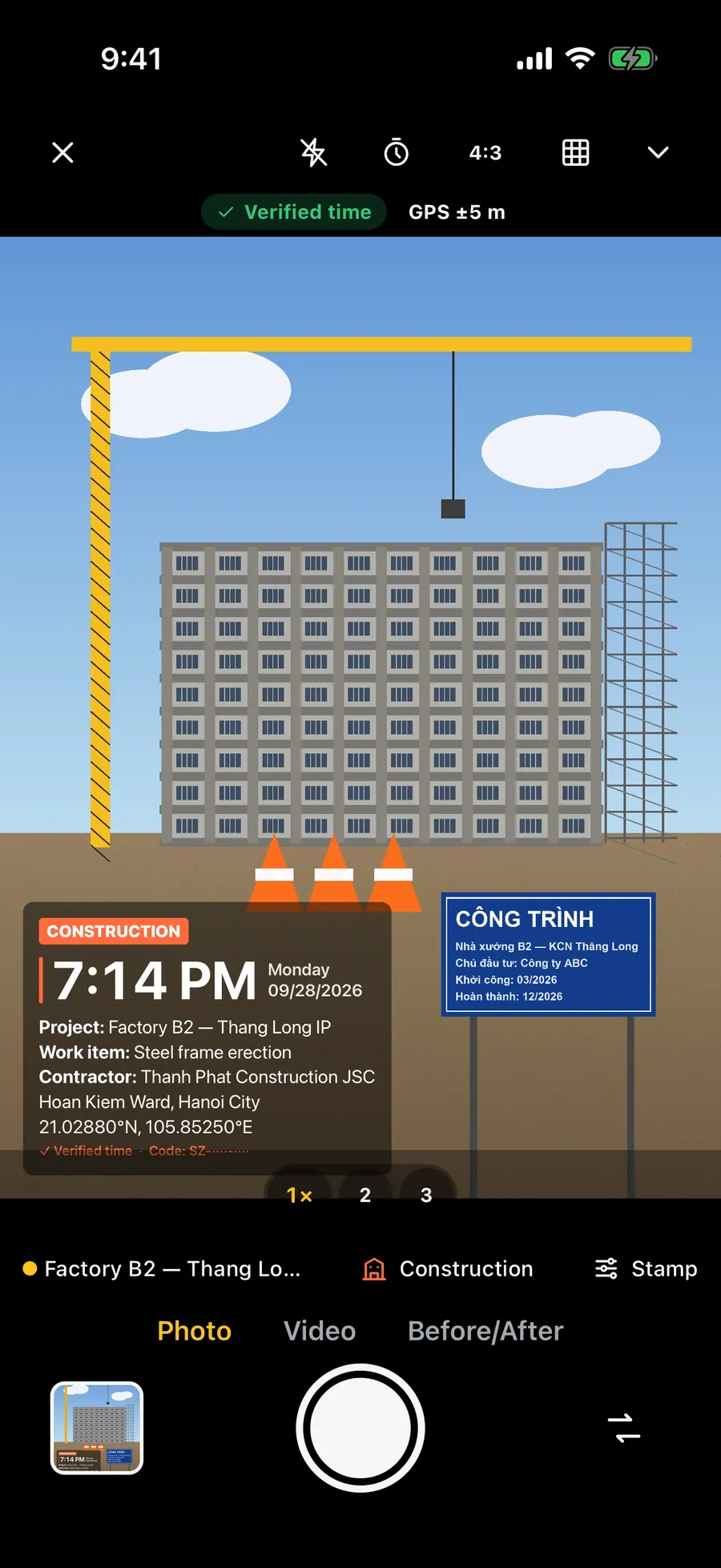
The iPhone Camera saves the time and, if Location Services is on for the Camera, the coordinates in each photo's hidden data. That data is often removed when photos are sent through a chat app, a web form or an email client, and a reviewer may never look at it.
Without an app, start with a photo of the rental agreement or the lot's sign, and film the screen of a phone showing the time and date. Printing the date, time and place on the picture makes them visible to anyone who opens it, and it stays when you send the file. Never edit a photo in a way that changes what the damage looks like.
What should I keep afterwards?
- The rental agreement, the damage form signed at pickup and at return, and the final receipt.
- All the photos and videos from both pickup and return, in the original quality.
- Keep them for as long as the company's claim window runs, which differs by company and country, so check the contract. Some claims arrive weeks after the rental.
- If you are later charged for damage, send your pickup photos to the company, and to the insurer or card issuer that covers the rental, if there is one, and ask for the charge to be reviewed.
Frequently asked questions
- What should I photograph on a rental car before driving away?
- All four sides, every panel, a close-up of each scratch or dent, the wheels, the glass, the interior, and the dashboard showing fuel and mileage. Add a walkaround video and make sure the damage is on the rental form too.
- Do photos replace the damage form?
- No. Ask staff to note any damage on the form as well. The photos support the form, and the form is what the company will look at first.
- Should I photograph the car again at return?
- Yes. Repeat the same set in the same order, ideally with staff present, so you can show the car's condition when you handed it back.
- Does a timestamp on the photos win a damage dispute?
- No. It makes the time and place easy to see, but the company and any insurer decide under their own rules. Clear, honest, well-ordered photos only make your case easier to assess.